

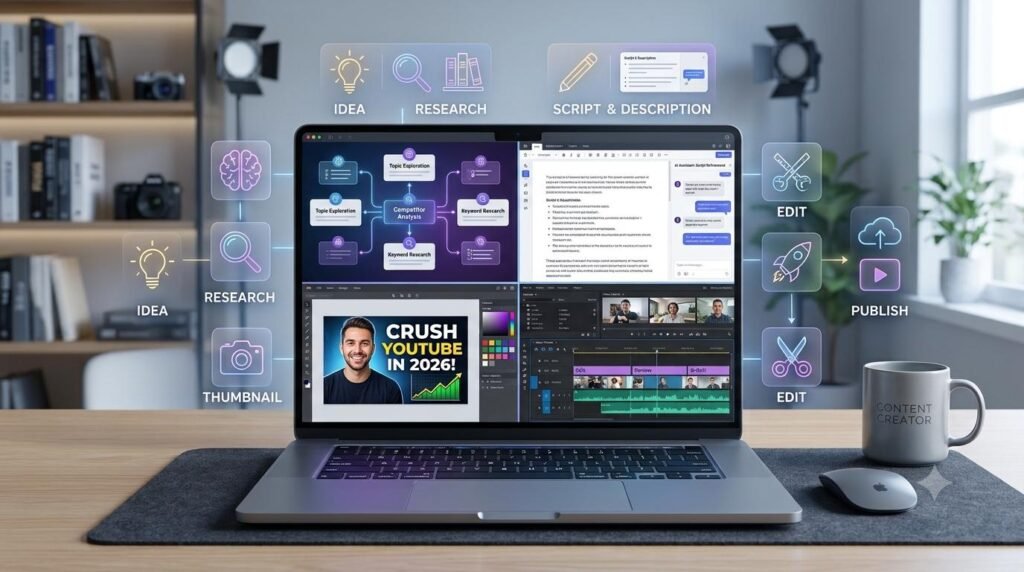
An AI YouTube content workflow helps creators plan video ideas, research topics, write engaging scripts, create thumbnails, and prepare videos for publishing. By following seven practical steps, you can organize your YouTube production process, save time, and maintain content quality.
An AI YouTube content workflow helps you organize these tasks into a repeatable process. Instead of starting from scratch for every video, you can use AI tools to support planning, scripting, optimization, and quality checks while keeping creative decisions under your control.
In this guide, you will learn a practical, seven-step workflow to move from a video idea to a published YouTube video.
Table of Contents
ToggleWhat Is an AI YouTube Content Workflow?
An AI YouTube content workflow is a structured process that uses artificial intelligence to assist with different stages of video production.
It helps creators organize their work, reduce repetitive tasks, and prepare video content more consistently. AI can suggest ideas, organize research, draft scripts, generate title options, and help prepare descriptions. You still need to review the output and make sure the video meets your audience’s needs.
A simple YouTube workflow looks like this:
Video Idea → Research → Script → Title and Thumbnail → Video Production → SEO and Quality Check → Publish
Each stage has a specific purpose, making the entire process easier to manage.
A well-planned AI YouTube content workflow also helps you repeat your production process while adapting each video to its topic and audience.
Why Use AI in Your YouTube Workflow?
AI can support several time-consuming tasks involved in creating videos.
Video brainstorming: Explore possible topics and different angles for your audience.
Topic research: Organize questions and identify information that needs verification.
Script planning: Create outlines, hooks, and first drafts.
Title development: Generate alternative titles that clearly communicate the video’s value.
Thumbnail planning: Explore visual concepts and concise thumbnail text.
Description writing: Prepare a useful summary and relevant links.
Content organization: Turn your process into a checklist you can reuse for future videos.
AI does not guarantee more views, higher rankings, or viral results. Its value depends on how well you use it and how useful your final video is to viewers.
Step 1: Find a Video Idea Your Audience Wants
Start by identifying the audience you want to serve and the problems, questions, or interests your videos should address.
Look at comments on your existing videos, common audience questions, relevant search suggestions, and topics that fit your channel. You can also review competing videos to understand what has already been covered and identify opportunities to offer a clearer or more useful explanation.
Use AI to brainstorm ideas, not to decide automatically what you should publish.
AI prompt for YouTube video ideas
Act as a YouTube content strategist. My channel focuses on [niche], and my target audience is [audience]. Generate 15 useful video ideas that address specific audience questions or problems. For each idea, suggest the viewer’s intent, a possible video angle, and why the topic may be useful. Avoid repetitive ideas and do not invent search-volume statistics.
Review the suggestions and choose a topic that matches your channel’s focus and your ability to produce a useful video.
Your output: One focused video idea with a clearly defined target viewer.
Step 2: Research the Topic and Plan the Video
Before writing a script, gather reliable information about the topic. Research helps you avoid vague explanations and gives your video a stronger structure.
Identify the main question the video should answer, the supporting points viewers need to understand, and any facts that require verification.
For tutorials, test the steps yourself whenever possible. For educational videos, check reliable sources and keep track of references. For product-related content, verify current features and limitations before making claims.
AI prompt for video research
Help me create a research plan for a YouTube video about [topic] for [target audience]. List the key questions to answer, the main points to explain, useful examples to prepare, and claims that need verification. Do not invent facts, statistics, quotations, or source URLs. Use these notes and sources where provided: [insert research notes].
Use the results to create a concise research document. Remove points that do not support the video’s main purpose.
Your output: Verified research notes and a clear explanation of what the video will cover.
Step 3: Write an Engaging Video Script
A good YouTube script gives the video direction while leaving room for a natural presentation.
Start with a hook that explains why the topic matters. Introduce the problem or promise of the video, organize the main points logically, and finish with a helpful conclusion.
Avoid long introductions that delay the useful information. Your opening should reflect what the video actually delivers rather than making exaggerated promises.
A simple video script structure
Hook: Introduce the problem, question, or result.
Introduction: Explain what the viewer will learn.
Main content: Present the steps, explanations, or examples.
Practical demonstration: Show how the advice works, where appropriate.
Summary: Reinforce the most important points.
Call to action: Invite a relevant next step, such as watching a related video or subscribing.
AI prompt for a YouTube script
Write a YouTube video script about [topic] for [target audience]. The video should help viewers [specific outcome]. Begin with a clear, engaging hook, followed by a brief introduction, logically ordered main sections, useful examples, and a concise conclusion. Use natural spoken language and avoid filler, exaggerated claims, and repetition. Use only these verified research notes: [insert notes]. Target video length: [duration].
Read the script aloud before recording. Rewrite awkward phrases and adjust the pacing to suit your speaking style.
Your output: A clear, natural script ready for recording or further editing.
Step 4: Create a Strong Title and Thumbnail Concept
Your video title and thumbnail help viewers understand what the video offers. They should work together without misleading people.
A title should communicate the main topic or benefit. A thumbnail should support that message with a clear visual idea and, if appropriate, a few readable words.
Avoid stuffing titles with unrelated keywords or using thumbnail text that promises something the video does not deliver.
AI prompt for YouTube titles
Generate 10 YouTube title options for a video about [topic] aimed at [audience]. Keep them clear, specific, and accurate. Use different approaches, such as a practical tutorial, a common problem, a step-by-step guide, and a useful outcome. Avoid misleading claims and unnecessary keyword repetition. The video covers: [brief summary].
AI prompt for thumbnail concepts
Suggest five thumbnail concepts for a YouTube video about [topic]. For each concept, describe the main visual, composition, contrast, and optional short text. The design should be easy to understand on a mobile screen and should accurately represent the video. Avoid clutter and do not include claims that the video cannot support.
Choose the title and thumbnail combination that best represents your actual content. You can compare alternative versions through YouTube’s available testing features when eligible.
Your output: A clear video title and a thumbnail concept aligned with the content.
Step 5: Produce and Edit the Video
Once your idea, research, script, title, and thumbnail concept are ready, move to video production.
Record your video, capture screen demonstrations if needed, and edit the material into a clear sequence. Use your script as a guide rather than forcing every sentence to sound identical to the written draft.
AI tools may assist with tasks such as transcription, caption drafts, removing pauses, organizing clips, or preparing editing notes. The available features depend on the tools you choose.
During editing, check:
Audio clarity and volume.
Video quality and visual consistency.
Whether demonstrations are easy to follow.
Whether on-screen text is readable.
Whether captions accurately reflect the speech.
Whether any unnecessary sections can be removed.
Always review automatically generated captions and edits before using them.
Your output: A complete video that communicates the intended message clearly.
Step 6: Optimize the Video and Check Its Quality
Before uploading, prepare the supporting details viewers need to understand and access your video.
Write a description that accurately summarizes the content. Add relevant links, chapters where useful, and any appropriate disclosures. Select a suitable thumbnail and check the title against the actual video.
Use relevant search phrases naturally. You do not need to repeat keywords excessively or add unrelated tags.
AI prompt for a YouTube description
Write a clear YouTube video description for a video about [topic]. Summarize what viewers will learn, include the main topics covered, and leave a clearly marked place for relevant links. Use the keyword [primary phrase] naturally where appropriate. Do not invent timestamps, links, results, or claims. Video outline: [insert outline].
Pre-upload checklist
The title accurately describes the video.
The thumbnail is clear and readable on mobile.
The description matches the content.
Links work correctly.
Captions and on-screen text have been checked.
Audio and video quality are acceptable.
Relevant privacy, copyright, and disclosure requirements have been considered.
The audience and publishing settings are correct.
Your output: A reviewed video package ready for upload.
Step 7: Publish, Review Performance, and Improve
Publishing is not the end of the workflow. Once the video is live, review its performance to understand how viewers respond.
YouTube Analytics can help you examine metrics such as impressions, click-through rate, watch time, audience retention, and traffic sources. Interpret these metrics in context rather than relying on a single number.
For example, if viewers leave early, review whether the introduction matches the title and delivers value quickly. If a video receives impressions but few clicks, consider whether the title and thumbnail communicate the topic clearly. Results vary by audience, niche, and video.
Use what you learn to improve your next video rather than assuming that one result will apply to every upload.
AI prompt for video performance review
Help me review the performance of my YouTube video using the data I provide. Identify possible patterns in impressions, click-through rate, watch time, audience retention, and traffic sources. Suggest questions to investigate and practical experiments for future videos. Do not claim that a metric proves a single cause. Here is the available data: [insert analytics].
Your output: A short performance review with useful observations and next steps.
Example: A Complete YouTube Workflow in Practice
Imagine you run a channel that teaches beginners how to use digital tools.
You decide to create a tutorial about using an AI tool to organize daily work.| Stage | Example task | Output |
|---|---|---|
| Idea | Identify a common beginner problem | Focused video topic |
| Research | Verify the tool’s features and test the process | Research notes |
| Script | Explain the process step by step | Recording script |
| Title and thumbnail | Prepare clear title options and visual concepts | Video packaging |
| Production | Record and edit the tutorial | Finished video |
| Optimization | Review the title, description, captions, and links | Upload-ready video |
| Publish and review | Publish and examine analytics later | Improvement plan |
Common AI YouTube Workflow Mistakes to Avoid
Publishing scripts without reviewing them
AI may produce repetitive language, inaccurate claims, or examples that do not fit your audience. Read and revise scripts before recording.
Choosing topics only because AI suggests them
An idea still needs to fit your channel and provide value to viewers. Use audience questions, your own expertise, and relevant research to make the final decision.
Creating misleading titles or thumbnails
Curiosity can help attract attention, but the video must deliver what the title and thumbnail imply. Misleading packaging can damage audience trust.
Ignoring originality and copyright
Do not assume AI-generated text, images, music, or other assets are automatically free of copyright or usage restrictions. Check the applicable rights and licenses for assets you use.
Expecting instant growth from SEO
Optimizing a title and description does not guarantee views or rankings. Viewer satisfaction, topic relevance, competition, and many other factors can affect performance.
Skipping analytics review
Publishing without learning from results means missing opportunities to improve future videos. Review meaningful patterns and test changes carefully.
Frequently Asked Questions
What is a YouTube content workflow?
A YouTube content workflow is a repeatable sequence for planning, researching, scripting, producing, optimizing, publishing, and reviewing videos.
How can AI help with YouTube videos?
AI can support brainstorming, research planning, script drafting, title options, thumbnail concepts, descriptions, captions, and performance analysis. Human review remains important for accuracy, originality, and quality.
Can beginners use AI to create YouTube videos?
Yes. Beginners can use AI to organize ideas and prepare scripts and checklists. They should learn the production process, verify information, and make sure the final video provides genuine value.
Does AI guarantee more YouTube views?
No. AI tools do not guarantee views, subscribers, or rankings. A useful topic, accurate content, clear presentation, and audience response all matter.
How often should I review YouTube analytics?
Review performance after a video has had enough time to collect meaningful data. Compare relevant videos and look for patterns rather than drawing conclusions from very limited data.
Recommended Digital Resources for YouTube Creators
Creating YouTube content involves planning, writing, editing, and organizing many small tasks. Useful digital resources can help you manage your work and develop your content creation skills.
Explore digital products and resources that can support your creative workflow.
Need a Free Tool for Your Next Video?
Use helpful online utilities to support your everyday digital tasks. Explore our free tools collection for practical utilities that can complement your YouTube content workflow.
Final Thoughts
A practical AI YouTube content workflow helps you move from an initial idea to a published video through clear, manageable stages. Use AI to brainstorm, organize research, draft scripts, develop title and thumbnail ideas, and prepare upload details.
Keep your own judgment involved at every stage. Verify information, respect copyright, review the final video, and use analytics to improve future content.
The goal is not simply to produce videos faster. It is to create useful, trustworthy videos through a consistent and repeatable process.
Related Guides
Explore more practical guides to learn, work, and grow with AI.

How to Build an AI Content Workflow
Learn how to build a practical AI content workflow to research ideas, create better content, and streamline your publishing process.

AI Workflow for Beginners
Learn how to organize everyday tasks and build a practical workflow with AI.