

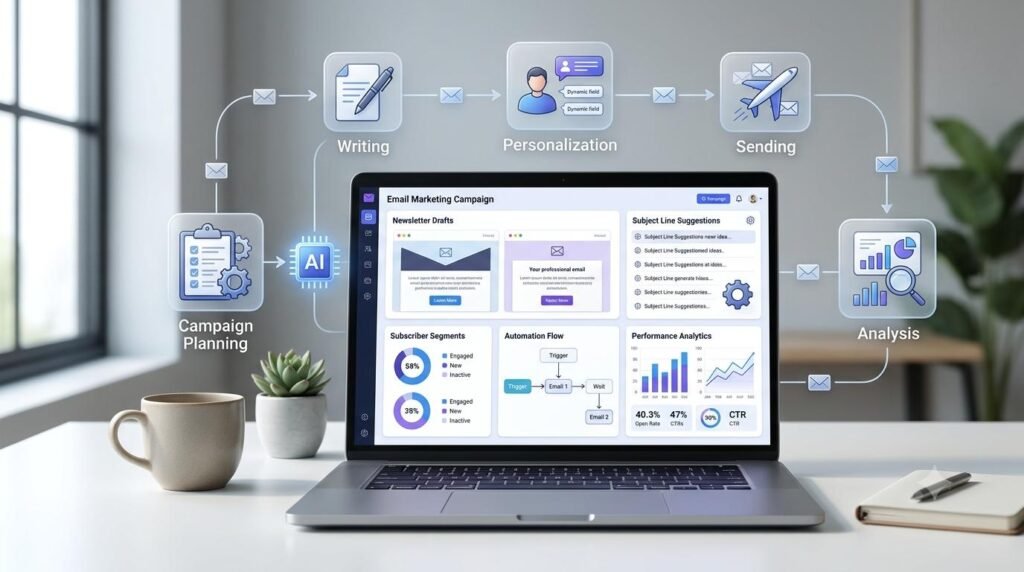
Email marketing remains a useful way for businesses, creators, and website owners to communicate with their audiences. However, planning campaigns, writing email content, organizing subscribers, and reviewing performance can take considerable time. An AI Workflow for Email Marketing can help you organize these activities, prepare better email campaigns, and manage repetitive tasks more efficiently.
Instead of asking AI to create an entire campaign without direction, you can use it at different stages of your email marketing process. This guide explains how to build a practical workflow that combines AI assistance with your marketing goals, audience knowledge, and human review.
Table of Contents
ToggleWhat Is an AI Workflow for Email Marketing?
An AI Workflow for Email Marketing is a structured process that uses artificial intelligence tools to support email planning, content creation, personalization, campaign preparation, and performance analysis.
It helps you manage the different stages of an email campaign through an organized process.
For example, AI can help you:
Generate ideas for email campaigns.
Organize topics for newsletters.
Draft subject lines and email content.
Adapt messages for different audience segments.
Prepare welcome and follow-up email sequences.
Review email performance data.
Identify opportunities to improve future campaigns.
The purpose is not to send automated messages without supervision. It is to create a repeatable system that saves time while keeping your communication relevant, accurate, and useful.
Why Use AI for Email Marketing?
Email campaigns involve several activities that need planning and attention. AI can support many of these tasks and help make the process more organized.
1. Generate Campaign Ideas
Planning what to send subscribers regularly can be challenging. AI can suggest newsletter topics, product announcements, educational emails, seasonal campaigns, and helpful updates based on your audience’s interests.
2. Write Email Subject Lines
The subject line helps readers understand what an email is about. AI can suggest different subject line options based on the message, audience, and purpose of the campaign.
You should choose a subject line that accurately represents the email rather than relying on exaggerated promises.
3. Prepare Email Drafts Faster
AI can help create first drafts for newsletters, announcements, welcome emails, and promotional messages. You can then edit the draft to match your brand voice and communication style.
4. Organize Audience Segments
Different subscribers may have different interests and needs. AI can help you think through useful audience segments based on information you are permitted to use.
For example, you might organize subscribers by content interests, customer status, or the types of updates they requested.
5. Improve Campaign Analysis
AI can help summarize campaign reports, compare results, and identify possible areas for improvement when you provide accurate performance data.
Step-by-Step AI Workflow for Email Marketing
Let’s build a practical process that you can use for newsletters, business campaigns, product updates, and subscriber communication.
Step 1: Define Your Email Marketing Goal
Start by deciding what you want an email campaign to achieve.
Your goal might be to:
Share useful information with subscribers.
Welcome new subscribers.
Announce a new product or service.
Share updates from your website.
Invite readers to an event or webinar.
Encourage customers to explore a relevant offer.
A clear goal helps determine the email topic, message, audience, and call to action.
Example prompt:
“Act as an email marketing strategist. My business or website is about [describe your niche]. My target audience is [describe your audience]. I want to send an email campaign with the goal of [enter goal]. Suggest five relevant campaign ideas and explain the purpose of each.”
Review the suggestions and choose an idea that genuinely supports your objective.
Step 2: Understand and Organize Your Subscribers
Before writing an email, consider who will receive it.
A message intended for new subscribers may need a different approach from one sent to existing customers. Organizing your audience into relevant groups can make communication more useful.
Possible segments include:
New subscribers.
Existing customers.
Readers interested in a specific topic.
Subscribers who requested particular updates.
Customers interested in a particular product category.
Use only appropriate, permission-based subscriber information. Avoid collecting or using personal information without a valid reason and the necessary permissions.
Example prompt:
“My audience includes [describe subscriber groups]. Suggest a simple email segmentation plan based on their interests and relationship with my business. For each segment, recommend relevant email topics and explain why they may be useful.”
Check the suggestions against your actual subscriber data and privacy requirements.
Step 3: Plan Your Email Campaign Calendar
A campaign calendar helps you decide what to send and when.
Instead of sending emails randomly, prepare a manageable schedule based on your audience’s needs and your available content.
For example:
| Week | Email Type | Example Topic |
|---|---|---|
| Week 1 | Educational | A useful beginner’s guide |
| Week 2 | Newsletter | Recent updates and resources |
| Week 3 | Practical Tips | Five ways to solve a common problem |
| Week 4 | Announcement | A new resource or product update |
Example prompt:
“Create a four-week email marketing calendar for [business or website niche]. My audience is [target audience]. Suggest one email per week with its objective, subject idea, main message, and call to action. Keep the schedule relevant and avoid repeating topics.”
Adjust the calendar according to your publishing schedule and subscriber expectations.
Step 4: Write Email Subject Lines and Preview Text
The subject line and preview text introduce your message before someone opens the email.
AI can help you prepare multiple options with different approaches, such as informative, educational, announcement-based, or conversational.
Example prompt:
“Suggest five subject lines and matching preview text options for an email about [topic]. The target audience is [audience]. Keep the wording clear, relevant, and honest. Avoid misleading claims and unnecessary urgency.”
Choose a subject line that accurately reflects the email’s content. Do not promise something that the email does not deliver.
Step 5: Create the Email Content
Once your subject line and message are clear, prepare the email draft.
A useful email generally contains:
A clear opening.
A relevant message or useful information.
A simple explanation of the main benefit.
A clear call to action, where appropriate.
Example prompt:
“Write an email draft about [topic] for [target audience]. The purpose is [campaign goal]. Use a natural and helpful tone. Include a clear opening, useful information, and one relevant call to action. Avoid exaggerated marketing language.”
Review the draft and add details that reflect your actual business, products, experience, and brand voice.
Step 6: Personalize Emails Where Appropriate
Personalization can make email communication more relevant when it is based on appropriate subscriber information and genuine interests.
For example, you might prepare different versions of an email for beginners and experienced customers. You could also recommend resources based on the topics a subscriber has chosen to receive.
AI can help prepare these variations.
Example prompt:
“Adapt this email for two audience groups: [Group A] and [Group B]. Keep the main message consistent, but adjust the examples and explanations to match each group’s interests. Do not invent personal details or make assumptions about individual subscribers.”
Check that personalization is accurate and respectful. Avoid using sensitive personal information or making the message feel intrusive.
Step 7: Review and Prepare the Campaign for Sending
Before sending an email, review the content and technical setup carefully.
Check the following:
Does the subject line match the email?
Is the message clear and useful?
Are names, dates, and links correct?
Does the call to action work?
Does the email display properly on mobile?
Is the sender information recognizable?
Is the recipient list correct?
Is the unsubscribe option available where required?
Does the campaign follow applicable email marketing and privacy rules?
You can use AI to review the draft, but the final approval should remain with you.
Example prompt:
“Review this email campaign for clarity, grammar, repetition, tone, and readability. Check whether the subject line matches the message and whether the call to action is clear. Identify possible problems without inventing facts or changing the intended offer.”
Send a test email to yourself and check it on different devices before launching the campaign.
Step 8: Analyze Email Campaign Performance
After sending a campaign, review the results to understand how subscribers responded.
Depending on your email platform, useful metrics may include:
Delivery rate.
Bounce rate.
Open rate, where reliably measured.
Click-through rate.
Unsubscribe rate.
Conversions or enquiries.
Revenue attributed to the campaign, where applicable.
Remember that open rates can be affected by privacy features and automated image loading. Do not use a single metric to judge campaign success.
Example prompt:
“Analyze the following email campaign results: [insert campaign data]. Identify the strongest and weakest results, possible reasons for the performance, and three practical improvements to test in the next campaign. Use only the supplied information and clearly identify any assumptions.”
Use the actual report from your email marketing platform to make decisions. AI can help explain patterns, but it cannot determine causes that the data does not support.
Example: A Simple AI Email Marketing Workflow
Here is how the complete process can work for a small business or website.
| Stage | Your Task | How AI Helps |
|---|---|---|
| Planning | Define the campaign goal | Suggest campaign ideas |
| Audience | Organize subscriber groups | Recommend relevant segments |
| Calendar | Plan email topics | Prepare a campaign schedule |
| Subject | Choose the email subject | Suggest subject line options |
| Writing | Prepare email content | Create and improve drafts |
| Review | Check the campaign | Identify clarity and grammar issues |
| Analysis | Review campaign results | Summarize performance data |
This workflow can be adapted to weekly newsletters, product announcements, welcome sequences, and other email campaigns.
Common Mistakes to Avoid When Using AI for Email Marketing
AI can make campaign preparation easier, but careless use can damage communication quality and subscriber trust.
1. Sending Generic Emails
An email that contains only broad statements may not give subscribers a reason to read or act. Include relevant information, practical examples, and a clear purpose.
2. Using Misleading Subject Lines
A subject line should accurately describe the email. Avoid exaggerated claims, false urgency, or promises that the message does not fulfill.
3. Ignoring Subscriber Preferences
Subscribers should receive communication that matches what they signed up for. Respect their preferences and make it easy to unsubscribe.
4. Overusing Personalization
Adding a subscriber’s name does not automatically make an email useful. Personalization should improve relevance without making assumptions or using information in unexpected ways.
5. Sending Without Testing
Broken links, formatting issues, incorrect names, and missing information can reduce trust. Always test the campaign before sending it to your full audience.
6. Ignoring Campaign Data
If you never review campaign results, you may miss opportunities to improve. Analyze meaningful metrics and test changes carefully instead of assuming every AI suggestion will work.
Best Practices for Building a Reliable AI Email Marketing System
Follow these practices to make your workflow more effective over time.
Set a clear objective: Give every campaign a specific purpose.
Respect subscriber permissions: Send relevant communication to people who have appropriately opted in.
Maintain a campaign calendar: Plan emails in advance and avoid unnecessary messages.
Save useful prompts: Keep reusable prompts for subject lines, newsletters, welcome emails, and campaign reviews.
Keep your brand voice consistent: Edit AI drafts so they sound like your business.
Test before sending: Check content, links, formatting, and recipient settings.
Review performance regularly: Use actual campaign data to improve future communication.
Frequently Asked Questions (FAQs)
1. What is an AI Workflow for Email Marketing?
An AI Workflow for Email Marketing is a structured process that uses AI tools to support campaign planning, subject line creation, email writing, audience segmentation, personalization, and performance analysis.
2. Can AI write email marketing campaigns?
Yes. AI can help prepare email drafts, subject lines, newsletters, welcome messages, and promotional content. You should review every draft to ensure accuracy, relevance, and consistency with your brand.
3. How can beginners use AI for email marketing?
Beginners can start by defining a campaign goal, organizing their subscribers, planning email topics, drafting messages with AI, reviewing the content, and analyzing campaign results.
4. Can AI personalize email marketing messages?
AI can help prepare different email versions for relevant audience segments using appropriate subscriber information. Personalization should be accurate, respectful, and consistent with subscriber permissions.
5. Does AI help improve email marketing performance?
AI can help analyze campaign data, summarize results, and suggest possible improvements. However, actual performance depends on factors such as audience relevance, message quality, timing, deliverability, and the offer.
6. Should I check AI-generated emails before sending them?
Yes. Check facts, names, links, subject lines, formatting, calls to action, and compliance requirements. Always send a test email before launching a campaign.
7. Can AI automate the entire email marketing process?
Some email platforms support automation for tasks such as welcome sequences, scheduled campaigns, and follow-ups. AI can assist with content and analysis, but important decisions, subscriber permissions, and campaign reviews still require human oversight.
Final Thoughts
An effective AI Workflow for Email Marketing is not about sending more emails or automating every interaction. It is about planning relevant campaigns, creating useful messages, respecting subscriber preferences, and learning from real results.
Start with one simple newsletter or campaign. Follow the workflow from goal setting to performance review, and improve the process as you gain experience.
Use AI as a practical assistant, keep your subscribers’ needs at the center, and make every email worth receiving.
Explore More Practical Guides
Explore practical guides to use AI, improve your workflows, build digital skills, and grow your online business.





Explore Useful AI and Digital Tools with Arzoo
Make your digital work easier with practical online tools and utilities. Explore useful tools for writing, content creation, calculations, and everyday digital tasks.
Discover Digital Resources at DigiMarket
Explore useful eBooks, PDF guides, templates, and digital resources to support your learning, content creation, and online business journey.